


Your child can navigate YouTube, unlock your phone, and find their favorite game faster than you can find your glasses. Does that mean they are digitally literate? Not quite.
Digital literacy is not just knowing how to use a device. It is knowing how to use technology safely, critically, and responsibly. For elementary-age children, building these skills early is one of the highest-value things a parent or school can do. And yet most children receive almost no structured guidance on it at home, and patchy coverage at school.
This guide covers what digital literacy actually means for kids in grades K through 5, which skills matter most at which ages, how to build those skills without turning screen time into a battle, and why this matters for your child’s academic success now and their career readiness later.
This guide is part of a broader series on education and writing skills. If you are exploring the debate around traditional versus digital skills in schools, see our articles on the reasons why cursive should not be taught in schools and the full breakdown of typing vs. cursive for kids.
Quick Answer
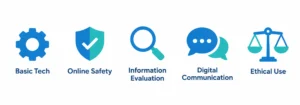
Digital literacy for elementary students includes five core areas: basic technology use, online safety, information evaluation, digital communication, and ethical use of technology. Children can start building these skills in kindergarten with age-appropriate activities. Parents play a central role because schools alone cannot cover all of it. The goal is not more screen time. It is better screen time.
Why Digital Literacy Matters for Young Children
UNICEF, in an article published through the Institute of Electrical and Electronics Engineers (IEEE), identifies digital literacy as a key component of general skills development for elementary students. The argument is straightforward: children who do not develop digital skills early fall behind, and the gap tends to widen rather than close.
The stakes are real. By the time most students reach middle school, they are expected to submit typed assignments, conduct online research, collaborate on shared documents, and evaluate information from multiple digital sources. A child who arrives at sixth grade without a foundation in these skills faces academic disadvantage that is hard to recover from quickly.
At the same time, digital literacy is not only about academic readiness. Recent Pew Research Center surveys found that nearly half of parents with children under 18 said their child spends too much time on digital devices. The challenge is not reducing technology use. It is making that use purposeful, safe, and skills-building rather than passive and unguided.
The 5 Core Areas of Digital Literacy for Elementary Students
1. Basic Technology Use
Before anything else, children need foundational device competence. This includes:
- Turning devices on and off, and basic navigation
- Using a keyboard and mouse or trackpad with reasonable control
- Opening, saving, and organizing files
- Using basic word processing tools (typing, formatting, spell-check)
- Connecting to the internet safely
This is the foundation everything else builds on. Children who struggle with basic device operation spend cognitive energy on mechanics rather than learning. For this reason, keyboarding instruction from around second grade onward is a practical priority, not a luxury. This connects directly to the broader conversation about why many educators now argue that typing deserves more curriculum time than cursive. See our guide on typing vs. cursive for kids for a detailed breakdown.
2. Online Safety
For elementary-age children, online safety is the most urgent area. It includes:
- Understanding what personal information should never be shared online (full name, address, school, phone number, passwords)
- Recognizing that not everyone online is who they say they are
- Knowing what to do if something online makes them uncomfortable (tell a trusted adult immediately)
- Understanding that actions online can have real-world consequences
- Basic awareness of cyberbullying, what it looks like, and how to respond
Online safety conversations work best when they are ongoing, not one-time lectures. The goal is to build a child’s confidence to come to you when something feels wrong, rather than hiding it out of fear.
3. Information Evaluation
This is the skill that takes longest to develop but matters most. Children are surrounded by information online, and not all of it is accurate. Even elementary students can begin learning to ask:
- Who wrote this? (Author or source)
- Why did they write it? (Purpose: inform, persuade, sell, entertain)
- Is this information supported by other reliable sources?
- Does this look like a trusted website, or does something feel off?
A simple framework that works well for younger children is the SIFT method: Stop before sharing or believing something, Investigate the source, Find other coverage, and Trace claims back to the original context. Full mastery of this takes years, but planting the seed in elementary school makes middle and high school information literacy much easier to build.
4. Digital Communication
Elementary students are already communicating digitally through school platforms, messaging apps, and games. Teaching them to do so responsibly includes:
- Writing messages that are clear and kind
- Understanding tone in text (how the same words can sound different in writing vs. in person)
- Knowing the difference between private and public communication
- Understanding that digital messages can be saved, forwarded, and seen by people beyond the intended recipient
- Basic email etiquette for school communication
5. Ethical Use of Technology
Even young children can understand basic digital ethics:
- Giving credit when using someone else’s work or images (not copying and pasting without attribution)
- Respecting other people’s privacy online
- Understanding that downloading or sharing copyrighted content without permission is not acceptable
- Treating others online with the same respect they would in person
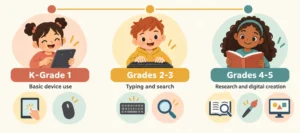
Age-by-Age Digital Literacy Milestones
| Age Group | Key Skills |
| K – Grade 1 (Ages 5-7) | Name device parts, navigate touchscreen, understand internet rules, know what information is private, begin keyboard familiarity |
| Grades 2-3 (Ages 7-9) | Type short paragraphs, use safe search tools, identify unreliable sites, use school platforms, understand cyberbullying |
| Grades 4-5 (Ages 9-11) | Type 20+ WPM, conduct research, create presentations, understand copyright, recognize ads and clickbait, understand digital footprint |
Balancing Screen Time With Digital Literacy
Here is the tension every parent knows: more screen time does not automatically mean more digital literacy. A child who spends three hours a day watching YouTube videos is not building the same skills as a child who spends 45 minutes doing guided typing practice, creating a digital presentation, or evaluating information for a school project.
The World Health Organization urges a “less is more” approach to unstructured screen time for young children. What matters is the quality and intentionality of technology use, not just the quantity.
Practical tips for home:
- Co-view and co-use technology with your child whenever possible, especially under age 8. What you do together, you can talk about and learn from together.
- Ask about what they see. “What is that? How do you know it is true? Who made it?” These questions build critical thinking without requiring a formal lesson.
- Set up a homework tech routine. A specific device, a specific time, and a clear task helps children use technology purposefully rather than drifting into passive consumption.
- Model good digital habits. Children notice when adults check phones constantly, share things without verifying them, or get frustrated with technology. What you demonstrate matters as much as what you teach.
How Schools Are Approaching Digital Literacy
Many schools are integrating digital literacy into existing subjects rather than teaching it as a standalone class. A reading lesson might include evaluating an online article. A science project might involve researching from multiple sources. A writing assignment might be submitted through a digital platform.
This integration approach works well when teachers are supported and the school has a clear framework. However, coverage varies significantly from school to school. Many families find that digital literacy skills their child is not getting at school need to be reinforced at home.
If you want to know what your child’s school covers, ask to see the school’s digital literacy or technology curriculum. Most schools that use a framework follow the ISTE Standards for Students, which provide age-appropriate benchmarks across all grade levels.
Connecting Digital Literacy to the Writing Skills Debate
Digital literacy and the debate over cursive writing are more connected than they might seem. Both are ultimately about preparing children for the world they will actually live in, not the world that existed a generation ago.
The argument that schools should prioritize keyboarding, critical information evaluation, and digital communication skills over mandatory cursive instruction comes from the same place: a recognition that classroom time is finite, and the skills with the highest real-world return deserve the most attention.
This is not about abandoning tradition for its own sake. It is about making sure children arrive at adulthood with the tools they need. For the full argument on where cursive fits in modern education, see our article on 5 reasons why cursive should not be taught in schools. And for parents of children with learning differences, our guide on learning differences and handwriting covers those specific needs.
Frequently Asked Questions
What age is appropriate to start teaching digital literacy?
Digital literacy can begin as early as age 4 or 5 with very simple concepts: device basics, the idea of private information, and supervised use of age-appropriate apps. More structured skills (research, evaluation, communication) build from ages 7 onward.
How much screen time is appropriate for elementary students?
The American Academy of Pediatrics recommends consistent limits on recreational screen time for children ages 6 and older, with an emphasis on quality over quantity. One to two hours of educational or interactive screen time daily is a common guideline for grades 1 through 5, but context matters more than a strict number.
Should children have their own devices in elementary school?
There is no universal answer. Shared family devices with supervision are generally preferable for younger children. By grades 4 or 5, many families find that a child’s own device (with parental controls and clear household rules) supports independence and digital skill-building.
What is a digital footprint and when should kids learn about it?
A digital footprint is the trail of information someone leaves behind through online activity. Children can begin learning this concept around grade 3. By grades 4 and 5, they should understand that things shared online can persist, be found by others, and affect how they are perceived.
How can I help my child with digital literacy if I am not very tech-savvy myself?
You do not need to be a technology expert. The most important things you can do are ask curious questions about what your child is doing online, set and hold clear household rules about device use, and create an environment where your child feels comfortable telling you if something online bothers them. Learning alongside your child is completely valid and often builds the relationship more than lecturing does.
Sources: UNICEF via IEEE, Pew Research Center, World Health Organization (screen time guidance), ISTE Standards for Students via Edmentum, KLA Schools digital literacy framework, Colorado Preparatory Academy.